Open source · MIT licensed · Agent UI framework

CopilotKit, the frontend layer for your AI agents

CopilotKit is an open-source framework that puts an AI agent inside your own app. It gives you chat components, frontend tools, generative UI and shared state, all connected to your agent through the AG-UI protocol. This guide covers what it does, how setup works and where to get the source.

License
MIT
Language
TypeScript
Main package
@copilotkit/react-core
Repo build
Node.js 20+
The CopilotKit interaction loop Conceptual workflow. Input: your React app sends messages and context. Operation: CopilotRuntime relays AG-UI events to and from your agent. Output: the agent's tool calls and generative UI render back in your app, and shared state keeps both sides in sync. Input Your React app messages + app context Your agent Agent framework LangGraph · Mastra · CrewAI PydanticAI · built-in agent Operation CopilotRuntime POST /api/copilotkit AG-UI event stream Output Tools & generative UI events shared state

What is CopilotKit

What is CopilotKit?

CopilotKit is a TypeScript framework for building the user-facing side of AI agents. It sits between your interface and an agent backend, so the agent can see what the user is doing, act inside the app and show its work as real UI.

  1. Problem

    Agents usually stop at an API. Letting an agent read app context, call browser-side functions, stream progress and wait for a human to approve something takes a lot of custom plumbing.

  2. Approach

    CopilotKit supplies that layer. You get a React provider and hooks, ready-made chat components, and a server runtime that passes events between your UI and the agent using the open AG-UI protocol.

  3. Outcome

    The agent works inside your product. It can read context you expose, call frontend tools, render components mid-conversation and pause for approval, without sending users to a separate chat tab.

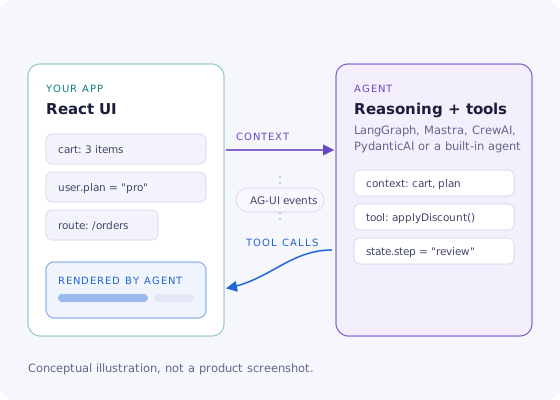
Diagram: a React app sends context through AG-UI events to an agent, and the agent sends tool calls back that render as UI in the app.
The loop CopilotKit manages: context goes out to the agent, and tool calls and state come back into your UI.
License
MIT (open source)
Protocol
AG-UI
Frontends
React / Next.js, Angular, Vue
Source
GitHub: CopilotKit/CopilotKit

Features

CopilotKit features, and how they connect

Everything hangs off one provider in your app. Hover or focus a capability to see where it sits in the diagram. Hook and component names are from the v2 React API.

Eight CopilotKit capabilities arranged around the CopilotKit provider 01Chat UI 02Frontend tools 03Generative UI 04Shared state 05Human-in-the-loop 06Threads 07Agentframeworks 08Agent skills CopilotKit PROVIDER
  1. 01

    Chat UI components

    Drop-in chat surfaces with streaming messages and tool-call rendering. Use them as they are, restyle them, or swap out individual parts like the input or message view.

    CopilotChat · CopilotPopup · CopilotSidebar

  2. 02

    Frontend tools

    Register functions that run in the browser so the agent can act on the page: fill a form, change a filter, move to another view or update a chart.

    useFrontendTool · useFrontendTools

  3. 03

    Generative UI

    Render your own React components for tool calls and agent output instead of plain text. The project describes three styles: static (AG-UI), declarative (A2UI) and open-ended (MCP Apps and open JSON).

    useRenderTool · useComponent · useDefaultRenderTool

  4. 04

    Shared state

    Your app and the agent can read and update the same state, so the interface reflects what the agent is doing while it does it.

    useAgent · useAgentContext

  5. 05

    Human-in-the-loop

    Pause the agent and ask a person to confirm, edit or reject a step before anything sensitive happens, such as sending an email or changing a record.

    useHumanInTheLoop · useInterrupt

  6. 06

    Threads and history

    Keep conversations around and let users return to them. Durable threads are part of the CopilotKit Intelligence platform layer, which can be hosted or self-hosted.

    useThreads · CopilotThreadsDrawer

  7. 07

    Agent framework integrations

    Because the wire format is AG-UI, the agent can be built with LangGraph, CrewAI, Mastra, PydanticAI and other frameworks. The frontend code does not change.

    @copilotkit/runtime

  8. 08

    Agent skills for coding assistants

    The repo ships skills that teach coding agents such as Claude Code, Codex and Cursor the current CopilotKit API, which helps when you're using AI to write the integration.

    npx copilotkit@latest skills install

How it works

How CopilotKit works in four stages

The same four stages apply whether you scaffold a new project or add CopilotKit to an app you already have. The code lines show the shape of each step, not a complete program.

  1. Input · install

    Add the packages

    Install the React package and the runtime from npm, or scaffold a new project with the CLI.

    npm i @copilotkit/react-core \
          @copilotkit/runtime
  2. Operation · server

    Mount the runtime

    Create an API route that hosts CopilotRuntime and points it at your agent. Model API keys stay on this server.

    // app/api/copilotkit
    // CopilotRuntime → agent
  3. Operation · client

    Wrap the app, add chat

    Put the provider at the top of your component tree, import the stylesheet once and render a chat component.

    <CopilotKitProvider
      runtimeUrl="/api/copilotkit">
  4. Output · act

    Give it context and tools

    Register frontend tools, expose app state and add approval steps. The agent can now act inside your UI.

    useFrontendTool({
      name, handler, … })

Use cases

What people build with CopilotKit

CopilotKit fits wherever an agent needs to work alongside a person in an interface rather than behind an API. These are common patterns. The tags show which capabilities each one relies on.

See the demo projects
  1. In-app support and onboarding assistant

    An assistant that knows which page the user is on and what their account looks like, so its answers are specific rather than generic.

    chat UIapp context
  2. Workflow copilot for SaaS products

    The agent fills multi-step forms, applies filters or builds a report draft, and the user watches each change land in the real interface.

    frontend toolsshared state
  3. Spreadsheet and data assistants

    Ask for a formula, a new column or a summary and get the result written into the grid. CopilotKit has published a spreadsheet demo along these lines.

    frontend toolsgenerative UI
  4. Agent-native canvases

    Research, planning or design canvases where a long-running agent and a person edit the same document, with progress streamed as it happens.

    shared stateagent frameworks
  5. Approval-gated actions

    Refunds, outbound emails or record changes that the agent prepares and a human signs off on before anything is committed.

    human-in-the-loop
  6. Agents in chat channels

    The README lists Slack and Microsoft Teams as supported surfaces, so the same agent backend can answer outside your web app too.

    channelsAG-UI

Installation / setup

Two ways to set up CopilotKit

Most people install the npm packages into an app. The source ZIP is for exploring the code, running the demos or contributing.

Path A · recommended for apps

Add CopilotKit to a project with npm

Works with Next.js (App Router), React Router, TanStack Start or a plain single-page React app.

  1. Scaffold or install

    For a new project, run the CLI. For an existing app, install the packages.

    # new project
    npx copilotkit@latest create
    # existing app
    npm install @copilotkit/react-core \
      @copilotkit/runtime
  2. Expose the runtime endpoint

    Add a server route, usually /api/copilotkit, that runs CopilotRuntime with your agent. Keep model API keys in server environment variables.

  3. Mount the provider and styles

    import {
      CopilotKitProvider,
      CopilotSidebar,
    } from "@copilotkit/react-core/v2";
    import "@copilotkit/react-core/v2/styles.css";
  4. Optional: give your coding agent the docs

    npx copilotkit@latest skills install
Path B · source ZIP

Build the repository from the ZIP

The archive is a pnpm and Nx monorepo. Check these before running anything.

  • Unzip to a folder without spaces in the path, then open a terminal there.
  • Use Node.js 20 or newer. The repo's .nvmrc pins 22.
  • Enable pnpm with corepack enable. The repo declares pnpm 10.
  • Run git init first. The prepare script installs Git hooks and expects a repository.
  • Run pnpm install, then pnpm build.
  • Start the React demo with pnpm demo:react.

Building needs a few GB of disk for dependencies. Cloning with Git gets you the same files plus history.

Compatibility

CopilotKit compatibility

CopilotKit is a set of JavaScript and TypeScript packages, not a desktop program, so "compatibility" means frontends, agent frameworks and build tools. Statuses reflect the project README as of October 2026.

Area Status Notes
React and Next.js Generally available The main target. The v2 API lives under @copilotkit/react-core/v2.
Angular Supported Published as @copilotkit/angular.
Vue Supported Published as @copilotkit/vue. The repo includes a Vue demo.
React Native Supported Listed as a supported frontend in the README.
Slack and Microsoft Teams Supported Channel surfaces for the same agent backend.
Discord and WhatsApp Via adapter Through the Channels SDK adapter. A managed connection is described as coming soon.
Agent frameworks Via AG-UI LangGraph / LangChain, CrewAI, Mastra, PydanticAI and others that speak AG-UI.
Windows, macOS, Linux No installer Nothing to install at OS level. It runs wherever Node.js and a modern browser run.
Building from source Requirements Node.js 20+ (.nvmrc pins 22) and pnpm 10.

Support levels change between releases. Check the project README before committing to a less common frontend.

Troubleshooting

Troubleshooting common CopilotKit problems

Most first-run problems come from the connection between the provider and the runtime. Work down the list.

  • The chat renders but never replies

    Likely cause

    runtimeUrl doesn't match your server route, or the route isn't deployed.

    Fix

    Open the browser's network tab, send a message and confirm the request to /api/copilotkit returns a streamed response. Then match the path exactly.

  • Components appear unstyled

    Likely cause

    The stylesheet isn't imported, or a v1 path is used in a v2 app.

    Fix

    Import @copilotkit/react-core/v2/styles.css once at your app's entry point.

  • "Module not found: @copilotkit/react-core/v2"

    Likely cause

    An older package version that predates the v2 entry point.

    Fix

    Upgrade all @copilotkit/* packages together so their versions match.

  • Hooks behave strangely after an upgrade

    Likely cause

    v1 and v2 imports are mixed in the same tree.

    Fix

    Move imports to /v2 consistently. The v2 migration guide lists the renames.

  • CORS errors in the console

    Likely cause

    The runtime is on a different origin from the frontend.

    Fix

    Allow the frontend origin on the runtime server, or proxy the runtime under the same domain.

  • pnpm install fails on the ZIP

    Likely cause

    Node.js is too old, pnpm isn't enabled, or there's no Git repo for the hooks step.

    Fix

    Use Node.js 20+, run corepack enable and git init, then install again.

Full troubleshooting guide

Download

Download CopilotKit

Get a ZIP of the main branch of the CopilotKit/CopilotKit repository on GitHub. It contains every package, example, agent skill and the documentation source in one archive.

Format
ZIP source archive
Contents
Main branch snapshot
To build
Node.js 20+ and pnpm
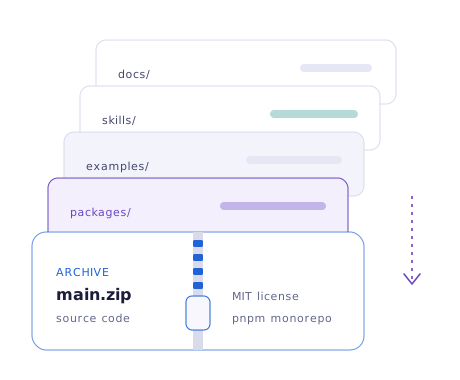
Illustration of the CopilotKit source archive opening into packages, examples, skills and docs folders.

Release information

CopilotKit release information

This site doesn't track version numbers, because releases come out often. These are the facts that stay stable.

Archive source
Main branch of CopilotKit/CopilotKit on GitHub
Packaging
npm packages under the @copilotkit scope, versioned and released together
Version line
1.x. Check GitHub Releases for the current number and notes
Current React API
v2 API exported from @copilotkit/react-core/v2, built on AG-UI
License
MIT

What "v2" changes in your imports

Before @copilotkit/react-core @copilotkit/react-ui useCopilotAction useCopilotReadable
v2 @copilotkit/react-core/v2 CopilotKitProvider useFrontendTool useAgent

According to the official migration notes, chat components move into react-core/v2 and the backend needs no changes. Read the v2 migration walkthrough.

Pros and cons

CopilotKit pros and cons

An honest look at where CopilotKit helps and where it adds cost or complexity.

Pros

  • Open source under MITYou can read, fork and self-host everything in the core framework.
  • Built for the UI side of agentsChat, tools, generative UI and approvals are first-class concepts, not add-ons.
  • Not tied to one agent frameworkAG-UI lets you change agent backends without rewriting the frontend.
  • Components or headlessStart with ready-made chat, then move to your own UI with the same hooks.
  • AI-assistant friendlyAgent skills and a docs MCP server keep coding assistants on the current API.

Cons

  • React comes firstAngular, Vue and React Native support exists but is newer than the React package.
  • The API moves quicklyThe v1-to-v2 change renamed hooks and moved imports, and older tutorials go stale fast.
  • You still need a backendA server runtime and an LLM provider or agent are required. CopilotKit doesn't replace them.
  • Some features sit in paid tiersHosted services and some premium extensions are commercial offerings.
  • Heavy to build from sourceThe monorepo is large. Most people never need to build it.

FAQ

CopilotKit FAQ

Twenty questions in two groups: getting and licensing CopilotKit, and building with it.

Getting and licensing CopilotKit

Pricing, the download, the repository and what this site is.

  • The core framework is open source under the MIT license, so you can use, modify and self-host it at no cost. The company behind it also sells optional hosted services and premium extensions. Whichever you choose, you still pay your own model provider for LLM usage. The Is CopilotKit free guide covers this in detail.

  • The download is GitHub's ZIP of the repository's main branch. It contains the npm package sources in packages/, example apps in examples/, agent skills in skills/, the documentation source and showcase projects. It is source code, not an installer.

  • No. Apps normally install the npm packages, such as @copilotkit/react-core and @copilotkit/runtime, with npm, pnpm or yarn. The ZIP is useful for reading the source, running the demos locally or preparing a contribution.

  • No. CopilotKit is a set of JavaScript and TypeScript libraries that become part of your web app, so there is nothing to install at the operating-system level. It works on Windows, macOS and Linux wherever Node.js runs.

  • The main repository is CopilotKit/CopilotKit on GitHub. It is a pnpm and Nx monorepo, and the download button on this page points at an archive of its main branch. The repository map explains what each folder does.

  • To build the repository from source, the root package.json requires Node.js 20 or newer, and the .nvmrc file pins version 22. For an app that only installs the packages, follow your framework's own Node.js requirement.

  • No. This is an independent guide written to explain CopilotKit and point to its public source code. It isn't affiliated with or endorsed by the CopilotKit project or its maintainers. See the disclaimer for details.

  • CopilotKit has published standalone demo repositories under its GitHub organization, including to-do, spreadsheet, presentation and banking examples. Inside the monorepo, pnpm demo:react starts the React demo in examples/v2/react/demo, and there are Angular and Vue demo scripts as well. See the demo guide.

  • Often. Patch releases on the 1.x line are common, and the @copilotkit packages are published together with matching version numbers. GitHub Releases on the repository lists each tagged version with notes.

  • The MIT license allows commercial use, modification and redistribution as long as the license notice is kept. Premium extensions offered by the company come under their own commercial terms, so check those separately if you use them.

Building with CopilotKit

v2, skills, components, agents and the docs.

  • v2 is the next-generation React API, exported from @copilotkit/react-core/v2 and built on the AG-UI protocol. Hooks and chat components now come from that single entry point, and according to the project's migration notes, existing backends don't need changes. See the v2 migration guide.

  • They are agent skills: folders of instructions and references that teach coding assistants such as Claude Code, Codex, Cursor and Gemini CLI how to use the current CopilotKit API. Install them with npx copilotkit@latest skills install. The skills guide lists what each one does.

  • The main ones are CopilotChat (inline), CopilotSidebar and CopilotPopup. Smaller building blocks such as CopilotChatView, CopilotChatInput and CopilotThreadsDrawer let you assemble a custom layout.

  • Yes. The @copilotkit/react-core/v2/headless entry point exposes the hooks without the UI, so you can use useAgent and related hooks to drive a completely custom interface.

  • Any agent that speaks AG-UI. The project names LangGraph and LangChain, CrewAI, Mastra and PydanticAI, and its integration skill also covers Google ADK, LlamaIndex and Agno.

  • No. The model is chosen by your agent or runtime configuration. CopilotKit handles the interface and the event stream, so changing providers is a backend decision.

  • AG-UI, the Agent-User Interaction protocol, is an open, event-based protocol for streaming messages, tool calls and state between an agent backend and a user-facing app. CopilotKit's team created it, and the project reports adoption by several other agent frameworks and cloud providers.

  • Yes. The usual setup puts the runtime in an App Router API route and the provider in your root layout. React Router v7, TanStack Start and plain single-page React apps are also supported.

  • Yes, through frontend tools registered with useFrontendTool. Each tool is a function in your app that the agent can call. For anything sensitive, wrap the step with useHumanInTheLoop so a person approves it first.

  • The official documentation is at docs.copilotkit.ai. It includes a v2 API reference and a docs MCP server that coding assistants can query. The docs reading guide suggests an order to read them in.